Published by the Zolyp team, reviewed by Hammas Ali, Founder & CEO · · Updated · How we check facts
What are Instagram story highlights?
A normal story disappears after 24 hours. A highlight keeps chosen stories on your profile, even after they've disappeared, until you remove them. Each highlight has a name and a cover, and people tap it to watch the stories inside.
Instagram saves the stories you share to your Stories archive, and you can turn that off in Settings (Menu, Your activity, Archived, Options, Settings, then the Save story to archive toggle). Leave it on if you want older stories to choose from. Instagram also says the archive and highlights aren't available for all accounts.
Anyone you've allowed to see your stories can also see your highlights.
Sources: Instagram Help Centre: Add a story to your Story Highlights, checked 20 October 2026; Instagram Help Centre: Archive Instagram Stories or turn off Stories archive, checked 20 October 2026
How do you create a new highlight?
Instagram's help centre gives these steps for the Instagram app on iPhone, iPad and Android:
- Tap Profile or your profile picture in the bottom right to go to your profile.
- Tap New. If you don't see New, tap Story highlight.
- Tap to select the story or stories you want in the highlight, then tap Next in the top right.
- Tap Edit cover to choose a cover photo, and enter a name for the highlight.
- Tap Add in the top right. The highlight now appears on your profile.

Source: Instagram Help Centre: Add a story to your Story Highlights, checked 20 October 2026
How do you add a story to an existing highlight?
While a story is still live:
- Tap Profile or your profile picture in the bottom right, then tap your profile picture in the top left to view your story.
- Tap More in the bottom right of the story you want to keep.
- Tap Highlight and choose the highlight to add it to.
- At any time: tap and hold the highlight on your profile, tap Edit highlight, and add stories from there
Source: Instagram Help Centre: Add a story to your Story Highlights, checked 20 October 2026
How do you edit, rename or delete a highlight?
In the app, tap and hold the highlight on your profile (it sits below Edit profile). Tap Edit highlight to add stories, or Delete highlight and then Delete to remove the whole highlight.
To remove a single story but keep the highlight, open the highlight, tap More in the bottom right of that story, then tap Remove from highlight and Remove.
To delete several highlights at once, tap Menu in the top right of your profile. Below How you use Instagram, tap Your activity, then tap Highlights below Content you shared. Tap Select in the top right, choose the highlights (you can sort by date or filter by date range), then tap Delete and confirm.
On a computer, click the highlight, click Options (some Instagram pages say More) in the top right, then click Edit. You can type a new name, click a story under Selected to remove it, or click Stories to add more. Click Next, then Done.
Sources: Instagram Help Centre: Edit or delete a highlight on Instagram, checked 20 October 2026; Instagram Help Centre: Add a story to your Story Highlights, checked 20 October 2026
Can you create highlights on a computer?
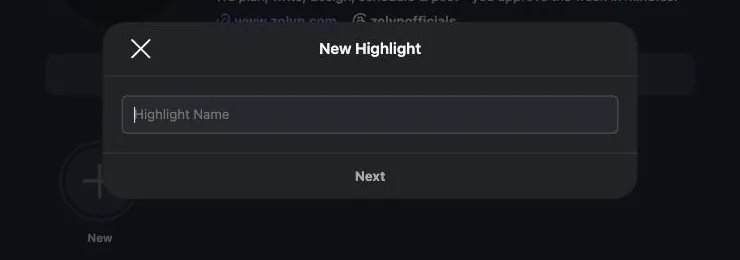
Instagram's computer help lists the steps below, although the same page tells you to use the Instagram app for Android, iPhone or iPad to add highlights. When we checked on 20 October 2026, instagram.com showed New on a business profile and walked through naming the highlight and picking stories. If New is missing on your computer, use the app.
- Click your profile picture on the left to go to your profile.
- Click New. If you don't see New, click Story highlight.
- Enter a name for the highlight and click Next.
- Select the story or stories to add, then click Next.
- Choose a cover photo and click Done.
- To remove one story from a highlight on the web, open the highlight, click Options in the top right of that story, then click Delete and Delete again
Sources: Instagram Help Centre: Add a story to your Story Highlights, checked 20 October 2026; Instagram Help Centre: Edit or delete a highlight on Instagram, checked 20 October 2026
How do you make good highlight covers?
You pick the cover with Edit cover when you create the highlight. Instagram doesn't publish cover design rules, but covers show as small circles, so these rules of thumb (our advice) keep them readable:
- Use a square image with the subject in the centre, so nothing important sits in the corners the circle cuts off
- Pick one simple icon or a single word per cover; detail disappears at that size
- Use your brand colours for the background so the row looks like a set
- Keep names short so they don't get cut off under the circle
- Put the most useful highlights first, since people see the first few without scrolling
Which highlights should a small business have?
Think of the questions people ask before they buy, and answer each one with a highlight. This is our suggestion, not an Instagram rule. Common sets include:
- Start here or About: who you are and what you sell, in a few stories
- Prices or Menu: what things cost, kept current
- FAQs: the questions you answer in messages every week
- Work or Results: before and after photos, finished jobs, new stock
- Customers: reviews and happy-customer stories you have permission to share
- Book or Visit: opening hours, location and how to order
Keeping the stories coming
Disclosure: this is our product. Highlights are only as good as the stories behind them. In Zolyp you can choose story as the format for a post, queue it and have it publish at the time you set once you approve it. You then add the best ones to a highlight in the Instagram app, which Zolyp doesn't do for you. There's a 3-day free trial, no card needed.
Common questions
Do Instagram highlights expire?
No. Stories you add to a highlight stay on your profile until you remove them, even after the original story has disappeared.
Who can see my highlights?
Anyone you've allowed to see your stories can also see your highlights.
Why can't I add an old story to a highlight?
Check that Save story to archive wasn't switched off when you shared it, and remember Instagram says the archive and highlights aren't available for all accounts. Instagram's help pages don't say what happens to stories shared while the archive was off, so if the story isn't listed, you probably can't add it.
How do I change a highlight's name?
On a computer, click the highlight, click Options or More in the top right, click Edit, type the new name and click Next. In the app, tap and hold the highlight and tap Edit highlight.
How do I delete a highlight?
Tap and hold it on your profile, tap Delete highlight, then tap Delete. This removes the highlight from your profile.